/
Deep Dive
How much faster are agents with WebMCP vs. clicking around on a website? We measured it.

Agents are starting to do work inside the web apps people once used, like updating a CRM or booking a trip. Many still do it the way a person would, by navigating the content and clicking around, which is slow and burns unnecessary tokens on every step.
WebMCP, a proposed W3C web standard, lets a site hand agents its actions as tools instead. Its backers say this makes agents faster and more reliable, but few published numbers compare the same agents interacting with the same app, and none compare it to having an MCP server. So we decided to test it ourselves.
Can’t wait to get to the punchline? With WebMCP tools on the page, Claude Code and OpenCode finished the same CRM tasks in ~75% less time and with ~90% fewer tokens than through the web interface. A remote MCP server exposing the same tools was faster still.
In this piece we look at the different ways agents use services online, how we ran the test, the results and what this means for your products.
What WebMCP changes
Agents have several different ways of interacting with services online.
Browsing the website: The agent uses the site the way a person would. It reads the page as a screenshot or a text snapshot of its structure, decides where to click, then reads the page again to see what changed. This works on any site, without the site's owner doing anything. But every step sends a fresh copy of the page into the agent's context, and a menu that moves is enough to cause a misclick.
Calling an MCP server: MCP lets a company give agents its product's actions as tools, such as update_deal or add_note, each with a name, a description and an input schema. The server is separate from the web app, so an agent can reach it without opening a browser. In exchange, it's a separate service to build, deploy and secure.
Calling WebMCP tools: WebMCP brings a similar idea into the web page. The site registers its actions as tools in the browser, and an agent visiting the page can call them directly. The tools reuse the site's own front-end code and the user's logged-in session, so they're quicker to add than a new backend. But they only exist while the page is open.
The WebMCP standard is still a draft, written by engineers at Microsoft and Google, but support is arriving fast. Chrome has offered it in an origin trial since Chrome 149, Stripe documents WebMCP tools for its Checkout pages, and OpenAI says ChatGPT Work and Codex "can discover and use these tools when they are available" in the desktop app's built-in browser.
How we tested WebMCP
We decided to test a use case familiar to any company: updating customer leads and opportunities. We set up a mock CRM using the open-source Atomic CRM by Marmelab, and generated 500 contacts, 55 companies and 50 deals from a fixed seed, so every run started from the same data.
Each agent was given the same tasks in three setups:
the plain website, which the agent drives through a browser like a person would;
the same website with 14 WebMCP tools, from
search_contactstocomplete_task, which reuse the app's data layer and refresh the screen after each write;a remote MCP server exposing the same 14 tools on its own copy of the data.
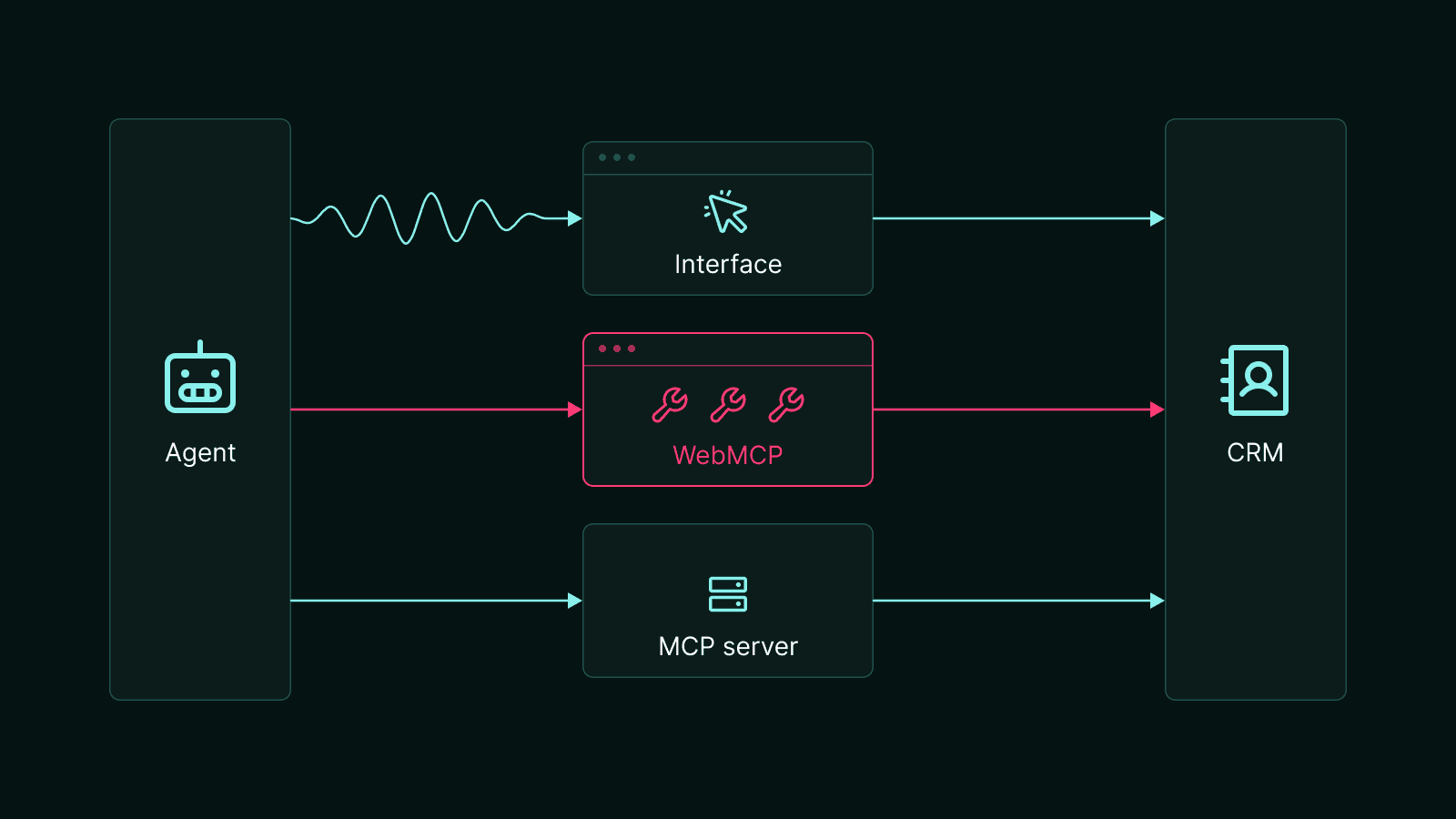
The three routes we tested from the same agent to the same CRM.
The agents we tested were Claude Code running Sonnet 5.5 and OpenCode running GPT-6 Luna. The two tasks we gave them were:
Deal revival: move every Delayed deal worth more than $10,000 back to Opportunity, add a note on each, and report the total ($196,600).
Account review: find the company with the highest total value of open deals, tag each of its contacts, schedule a follow-up call with them for the third Friday of next month, and add a note to each of its open deals (representing 12 contacts and 3 deals).
That made 12 configurations, each run three times and measured with a tool we built that records every tool call and token. Browser access and WebMCP support were turned on in every run, including on the plain website, so the agents were set up the same way each time and only the website changed.
WebMCP is 4x faster
Both agents finished every task faster with WebMCP than through the interface, taking 67 to 83% less time.

Median time per task over three runs, through the interface and with WebMCP.
WebMCP cuts tokens by ~90%
Token use fell even further than time, by 87 to 96%. When reviving deals, Claude Code used 2.3 million tokens through the interface vs 300k with WebMCP, and OpenCode went from 2.3 million to 100k.
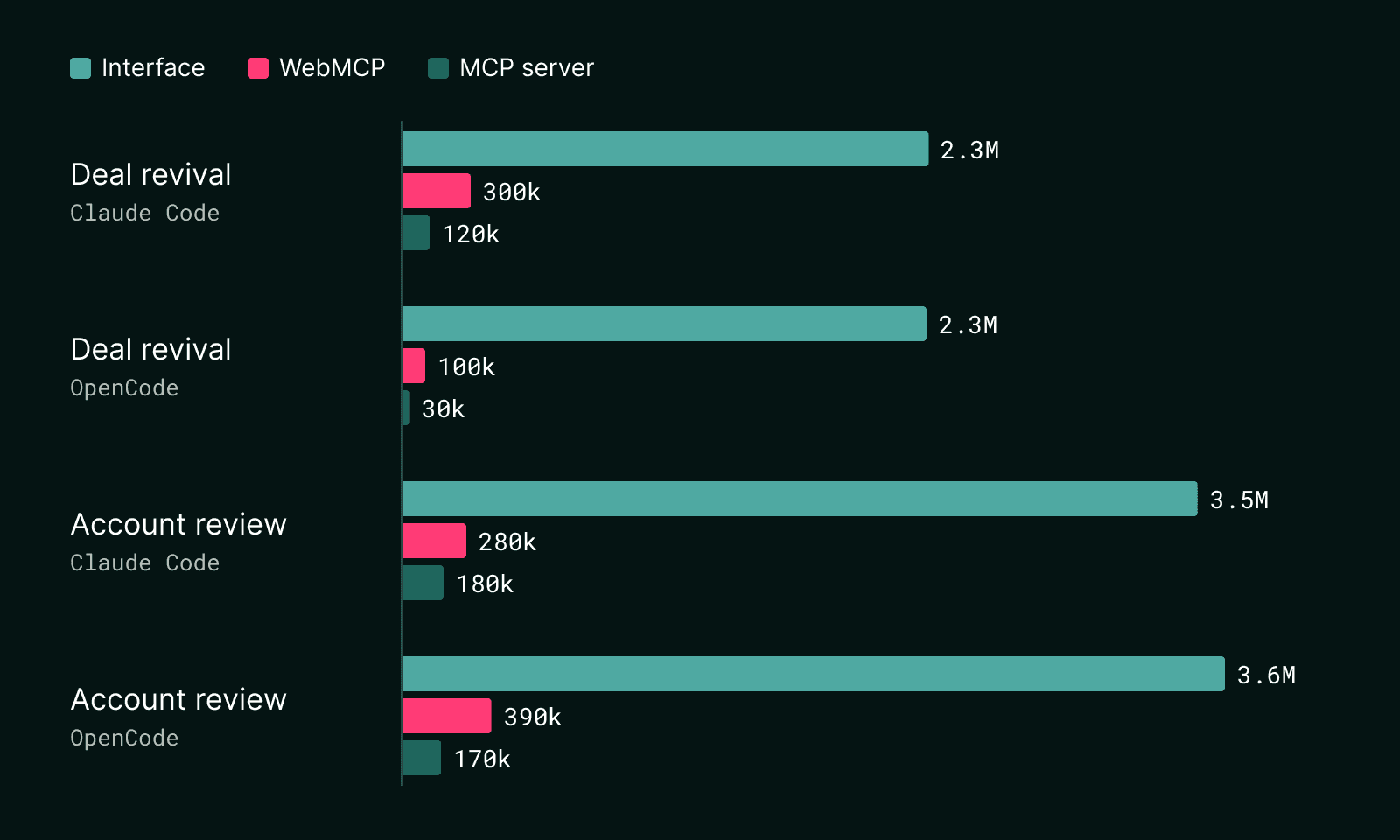
Median tokens per task over three runs, through the interface and with WebMCP.
Through the interface, most of Claude Code's 54 tool calls returned a fresh copy of the page, while each of its 14 WebMCP calls returned only a few lines of data. Every token is text the model has to read before its next move, so fewer tokens make each step quicker and keep the agent's context on the task instead of on page markup.
Caching takes some of the sting out of clicking. Model providers currently bill text the agent has already sent at a lower rate, and most of those page copies are repeats. But it doesn't close the gap, because the agent still re-reads the page at every step. OpenCode's deal revival, for example, still cost about three times as much through the web interface as with WebMCP.
What’s more, the efficiency and cost gaps compound with the number of repetitive steps. In an earlier single-run test, tagging the 10 contacts of one company took Claude Code over 5 minutes and 175 tool calls through the interface because it had to open each contact. With WebMCP it was one tag_contacts call, and the whole task took 42 seconds and 13 calls.
Clicking works, but it's error-prone
Somewhat surprisingly, even the agents that were using the web interface were able to complete the tasks correctly. However, they got there by making mistakes and fixing them. In one run a page reload wiped the agent's first changes and the task took 11 minutes. In another, a stale click closed a dialog without saving, and a stale menu created a duplicate tag that the agent then had to find and delete.
With tools, the agent never had to find a button, so none of this happened. That’s important not just in terms of time, but also because each detour is a chance to introduce errors into important customer records.
An MCP server skips the page entirely
When an MCP server was included with the task, both agents did the entire task through it and never opened up the site, even when the page offered WebMCP tools too. MCP produced the quickest and most efficient setup for both agents on both tasks, taking 24 to 48% less time than with WebMCP and using 36 to 70% fewer tokens. Compared with the interface, that's 81 to 90% less time and 95 to 99% fewer tokens.
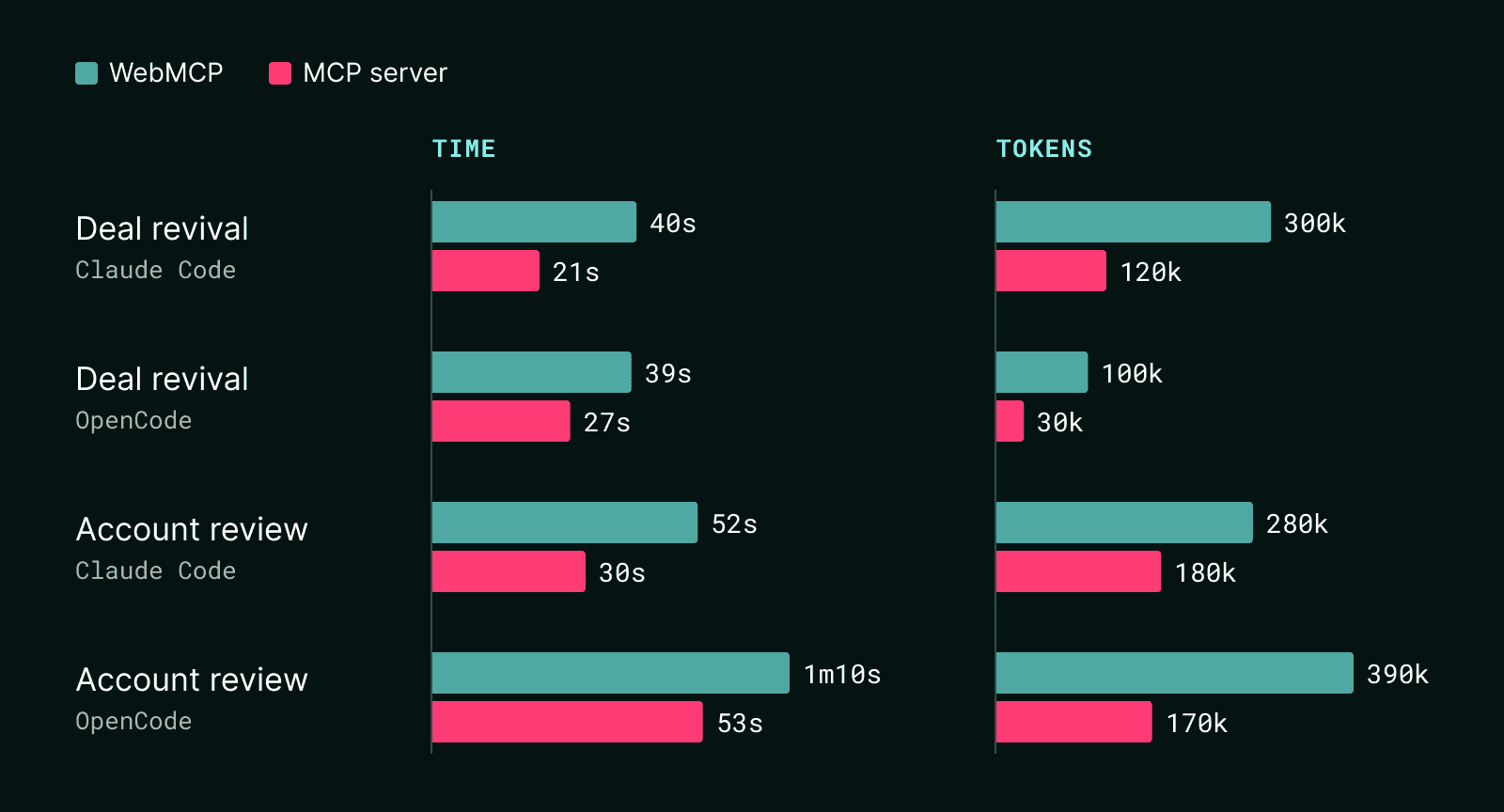
Median time and tokens per task over three runs, with WebMCP and with an MCP server.
What to take from this
Agents will use your product whether or not you build for them. Giving them tools instead of a page to click through makes them faster and cheaper to run, and leaves fewer chances for mistakes or data corruption along the way.
If agents already use your website, WebMCP is an easy upgrade. A handful of tools on the actions people repeat most turns minutes of clicking into seconds of tool calls, without building a new service. An MCP server takes more work, but it goes further. Agents can reach it from anywhere, with or without a browser, and they finish faster. For a product that agents use routinely, an MCP server is worth the investment.
Limits and what's next
This was a small test, with two tasks on one app, but it already points in the same direction as larger benchmarks such as nekuda’s WindTunnel.
And it’s just the beginning! We have plenty of ideas and experiments lined up:
More agents: using the browsers built into the most popular harnesses rather than our own setup.
Consumer use cases: to see how agents handle filling a shopping cart and checking out of an online store.
Tool design: measuring how much design changes the result, from batch tools that act on many records at once to write tools that return the updated record.
If there's something you'd like us to test, let us know!