/
MCP Guides
How to publish your MCP server on Grok Bot, Cursor & Grok directories

On October 14, 2026, xAI opened its plugin marketplace to outside developers. A single submission form now covers Grok Bot, xAI's agent product, as well as Cursor, and soon Grok itself. If you already run a remote MCP server, you can submit it without packaging anything new. This guide covers how to test your server first, then how to fill in the form.
Test in Grok Bot first
The form asks you to confirm you've tested the server locally and in the app, so do that before anything else. Grok Bot runs on your Cursor account and takes new servers through conversation rather than a settings page. Ask for yours in a chat, for example "Add a custom MCP server called acme at https://mcp.acme.com/mcp", approve the confirmation card, and complete your server's sign-in flow. Then try the requests you expect users to make, and watch which tool the bot picks for each one.
Grok Bot calls your server from the cloud, so a localhost URL or a server behind a private network is out of its reach. The endpoint has to be public over HTTPS.
Submitting to the marketplace
The form lives at x.ai/bot/marketplace/submit-a-plugin and fits on one page.
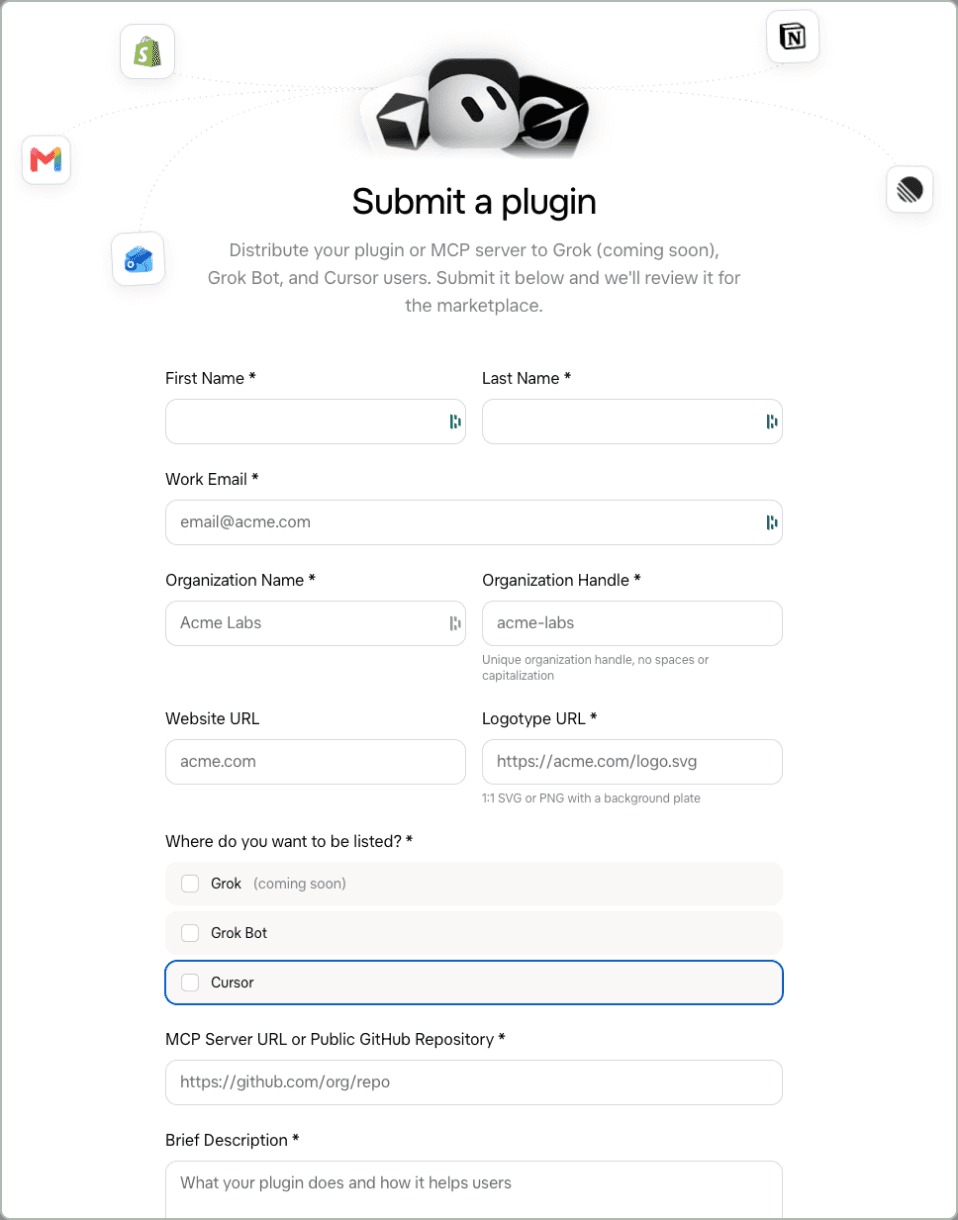
Your details. First and last name, a work email and your organization's name.
An organization handle. A unique handle in lowercase with no spaces. Pick it carefully, since it identifies you as a publisher.
Website and logo. Your website URL, plus a public URL for your logo, which must be square and in SVG or PNG format on a background plate rather than transparent.
Where to be listed. Choose any combination of Grok Bot, Cursor and Grok. The Grok option is marked as coming soon.
The server. Enter your MCP server URL, or a public GitHub repository if you're submitting a packaged plugin.
Description and testing instructions. Keep the description short and concrete. The testing instructions are what a reviewer follows, so include test credentials or a sign-up path, two or three prompts to try and what each should return.
Confirm and submit. Tick the box confirming you've tested the plugin, then submit. Submitting means accepting Cursor's Marketplace Publisher Terms, which are worth reading before you do.
Every submission is reviewed before it appears in the marketplace. xAI hasn't published review criteria or timelines yet.
Before you submit
A listing only helps if the bot uses your tools well once it's installed. Grok Bot decides when to call a tool from its name and description, so remember your MCP best practices and name each tool after the action it performs and describe when it should be used, not only what it returns. Then run your testing instructions from a fresh account, exactly as a reviewer would, before you hand them over.
Liked what you read here?
Get our newsletter!