/
MCP Guides
From deployed to live in the stores: submitting your MCP app to the ChatGPT app store & Claude connector directory with Alpic

Getting an MCP app running is in many ways the easy part. Getting it into the ChatGPT app store or Claude connector directory is where teams can lose hours or more.
First, each store has its own submission process.
The ChatGPT submission form alone involves six tabs, and many of the questions asked aren't obviously connected to the app you’ve built. Tool annotations need per-annotation justifications in writing. Screenshots must be exactly 706px wide and between 400 and 860px tall, showing only widget UI with no ChatGPT chrome around them. You need exactly 5 positive test cases and 3 negative ones in a specific structured format…
Meanwhile, Claude’s submission process is completely different. You must first add your app to your organization’s own directory before submitting it, then add screenshots of your app only once it’s submitted.
Both OpenAI and Anthropic still review apps manually, and a single misconfigured field can cost you a full review cycle with no timeline.
We know this because we’ve gone through that ourselves dozens of times and today we're shipping the app submission helper to fix it!
How the Alpic app submission helper works
The submission helper lives inside Alpic Cloud. Open any project, go to the Submissions tab, pick a store, and choose which environment you want to submit. Alpic starts filling in the form from what it already knows.

The pre-fill is split into two layers.
The first is deterministic: your production domain, your MCP server URL, tool names and descriptions pulled from your MCP manifest, transport configuration, tool annotations, and workspace metadata.
The second layer is AI-generated: description, tagline, and test cases, drafted based on your project metadata and tool annotations, with structured output validated before it reaches the form.
While some fields need to be filled in manually, the helper covers the full forms.
For ChatGPT that means the app info section including developer name and category, tool-annotation justifications, the test case builder with enforced counts, screenshots with client-side dimension validation, per-locale translation generation for description and tagline, country allowlisting, and the video handling for the demo recording requirement.
For Claude, this means listing, company, type of authentication, data handling, compliance, test credentials if needed.
A side panel on the side guides you through the steps if anything isn’t clear.

Additional checks to help you get it right
Beacon, our app audit tool, runs automatically when you create a submission. The analysis is non-blocking but its findings are shown in the lefthand panel: CSP issues, missing declarations, annotation coverage gaps, anything likely to trigger a rejection. You can rerun Beacon at any time from the submission helper if you make changes to your app in the meantime!
Store preview is built in. Before handing off, you can see a faithful recreation of how your app will look in the ChatGPT store and the Claude Connectors directory, both pulling live from your current form state. If something looks off, you fix it before it gets to review.
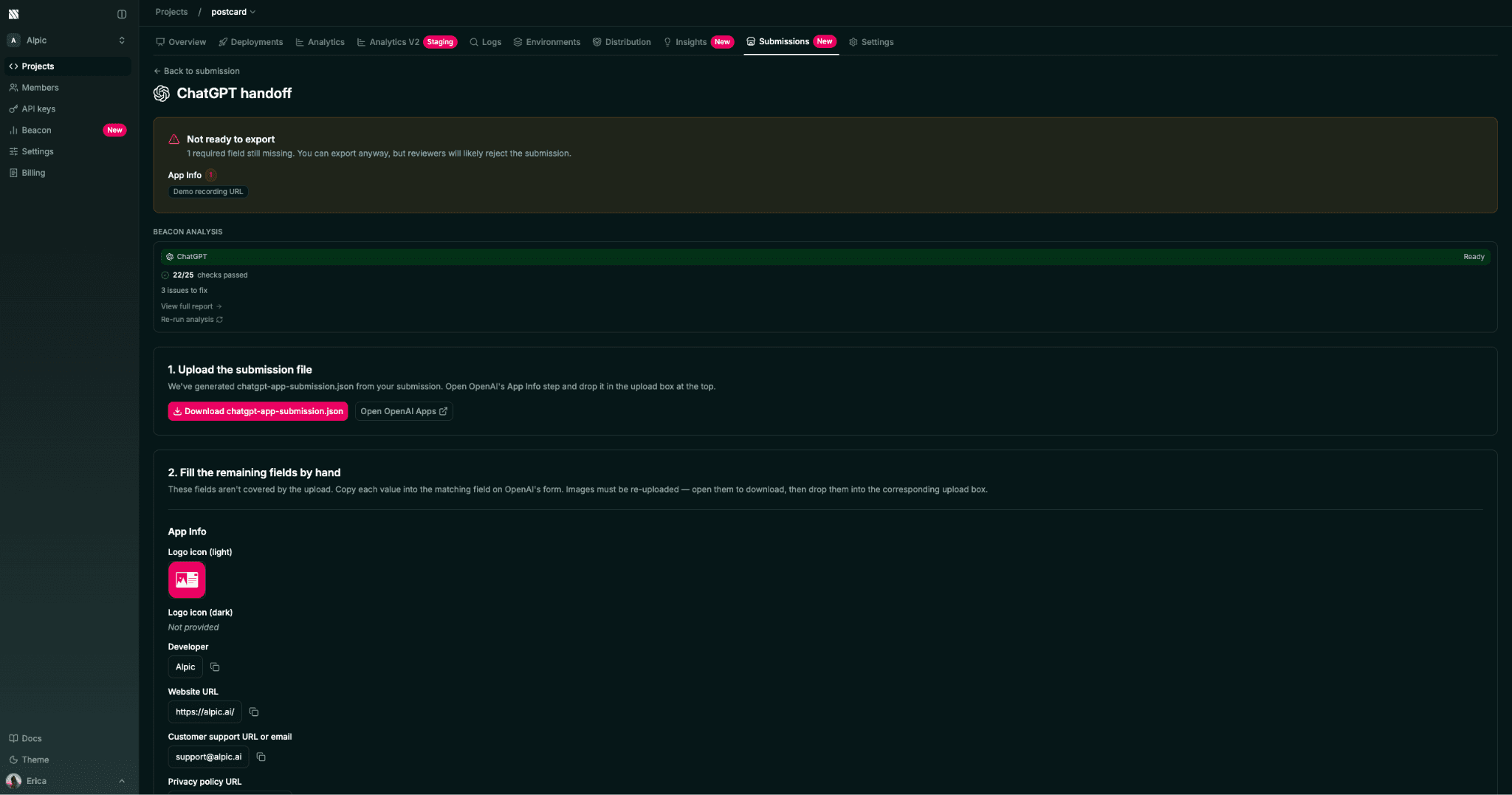
Handoff. For ChatGPT, the submission can take a JSON file that OpenAI's system ingests, alongside certain fields you’ll need to fill in manually on the form. The helper generates a JSON validated against OpenAI's schema before download and gives you a copy-paste card for the remaining fields, grouped by section. For Claude, you’ll need to submit your app through the directory wizard after connecting the MCP server as a custom connector in your account. Simply copy and paste the fields from our pre-prepared cards.
Why now?
Both stores are growing, and the review process isn't getting simpler. New versions, cross-store submissions, and resubmissions after rejection all involve repeating work you've already done. Alpic’s submission helper tracks submissions per environment and per store, and carries shared fields over when you copy across stores so you're not starting from scratch.
This first version covers ChatGPT and Claude. Future marketplaces (Cursor, Microsoft 365 Copilot) are on the roadmap, as are auto-generated screenshots and video.
If you have a server deployed on Alpic, the Submissions tab is already in your project. Try it and let us know what you think!
Liked what you read here?
Get our newsletter!