/
MCP Guides
Agents should be first-class citizens of your CLI
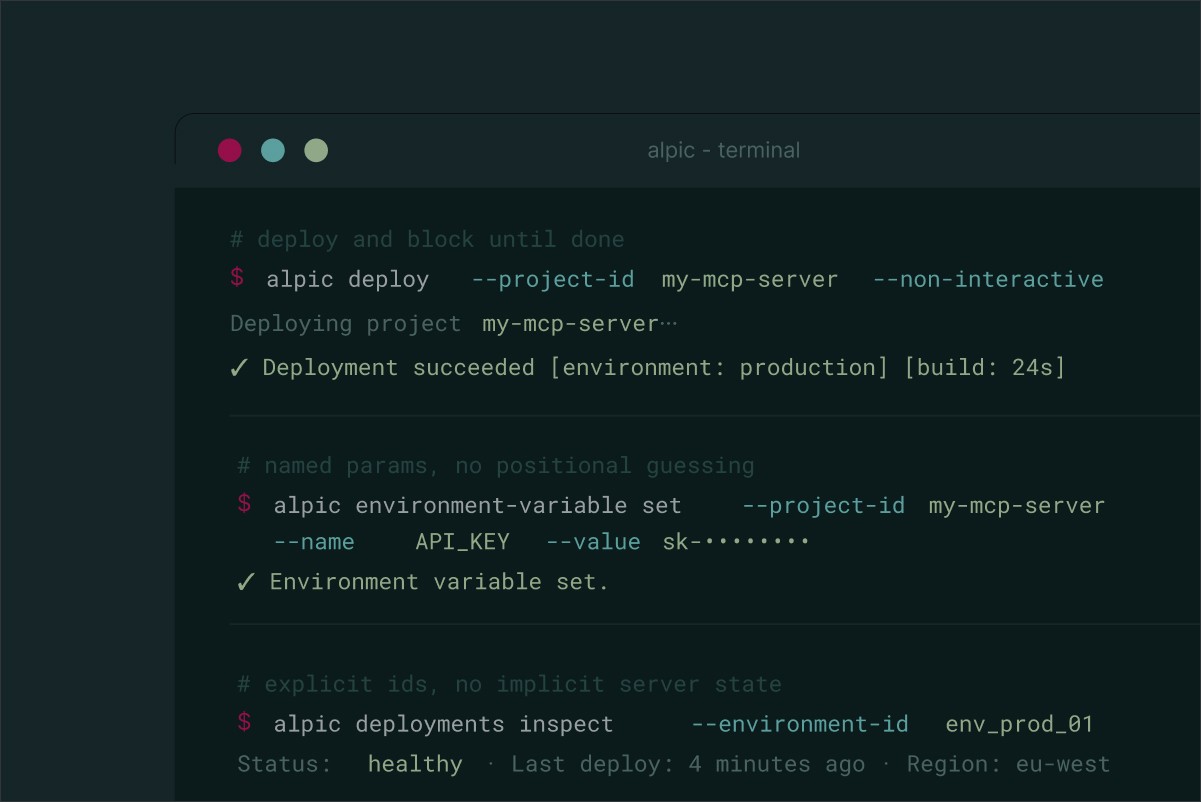
We recently released the Alpic MCP and CLI, giving users two new interfaces with which they can interact. Designing the Alpic CLI for both humans and agents surfaced a set of challenges and tradeoffs worth writing down!
Why does building for agents matter?
Interfaces and layouts were designed for humans, i.e. to be easy to understand, and actions easy to perform. At Alpic we believe that agents are becoming the new interface: instead of directly interacting with a system, humans interact with an agent that interacts with the system. The human-agent interaction has been solved by LLMs — naturally, as agents have been trained mainly on human content, they are very good at understanding humans.
With the Alpic engineering team we’re committed to solve the remaining challenge: the agent-system interface. In other words, how to give agents the capabilities to perform the same actions as humans do. Besides MCP, which has been designed exactly for this purpose, CLIs happen to be a surprisingly good connector. They were designed in the first place for humans to interact with machines in a textual way, so they naturally work well for agents too, which are heavily text-driven. On top of that, CLIs are composable and well-represented in training corpora, with lots of examples of how they should be used.
But designing a system (here a CLI) for both humans and agents comes with different requirements. This blog post explores these.
How are agents and humans different?
When it comes to CLIs, humans and agents behave surprisingly similarly: both will try calling a command with the --help flag to be guided toward the right usage.
The first difference is the context window: as an agent executes subsequent commands, it fills its context window, meaning that every additional call adds to token costs. This means verbose output is expensive — a command that dumps 200 lines of logs costs real money in an agentic loop.
Agents are also quite bad at polling. A human starting a deployment with a CLI will intuitively wait a minute or two before checking the status, expecting a final state (either deployed or failed). Agents won't wait around doing nothing; unless the command they executed blocks until completion, they'll immediately poll again and again.
Another difference is the inability for agents to handle interactive CLIs. This may improve in the future, but at the moment, agents are far more efficient sending non-interactive one-shot commands and getting the result as parsable JSON.
The Alpic CLI secret sauce
--non-interactive
All our commands implement a --non-interactive flag, which allows users to automatically accept confirmation prompts such as “Are you sure you want to…”. The goal is to reduce context usage and prevent agents from being blocked by interactive prompts.
We also chose not to provide a JSON output format for now. Our tests show that agents are fully capable of understanding output intended for human users, and since JSON is a relatively verbose format, it adds unnecessary overhead to context usage. Additionally, dynamic console artifacts (such as loading spinners) tend to fill the agent’s context with noise and should be avoided.
That said, this space is evolving quickly, and our perspective is still forming. We’d love to hear how others are approaching these tradeoffs. Feel free to share your experiences on our Discord!
Use only named parameters
We noticed that agents (and actually humans as well!) struggle with positional parameters in commands. By enforcing all parameters to be named, we reduce the risk of confusion by a lot. We also avoid a round trip to the documentation or to the --help flag.
No --cwd flag to avoid working directory confusion
We decided not to provide a way to choose the working directory of a command. For example, when creating a project with a relative root-dir: is it relative to the current working directory or to something else? Agents are good at navigating between folders, but bad at checking in which folder they execute a command, so removing --cwd reduces ambiguity.
We also added checks on deployment, for example to fail early if the directory the deploy command has been executed from is obviously a wrong one (e.g. an empty directory).
Commands better wait than returning early
Humans are fine with retrying a command every few seconds. Agents are not — they'll either poll aggressively (wasting tokens) or miss the final state entirely. Making commands block until completion is a much better fit for agentic workflows. Of course, when possible, it’s even better for commands to return quickly, as this gives control back to the agent to decide what to do next.
In practice, this means our alpic deploy command doesn't return until the deployment has either succeeded or failed. Of course if something snags, our CLI gives up and returns an explicit error rather than leaving the agent waiting forever.
Explicit command names, not abbreviated
Unlike humans, agents don't mind typing a few more keystrokes. To reduce ambiguity, all of our commands and parameters use full words. We chose for example to name our command alpic environment-variable instead of alpic env which could be mislead as a command to manage environments and not environment variables. We understand that this added verbosity slightly increases token usage, but our tests show it’s a worthwhile tradeoff, favoring clarity over minimal token usage.
Being stateless (not relying on implicit server state)
Humans know their own context: they may know, for example, whether they've already deployed their project successfully. An agent doesn't carry that context between sessions. Calling a command such as alpic deployments inspect without any parameter — expecting it to return the latest deployment — requires an implicit knowledge about what’s on the server that agents can't reliably track.
For example, inspecting a deployment requires explicitly passing either a --deployment-id or an --environment-id, and these are mutually exclusive. Even retrieving the “latest deployment” must be scoped to a specific environment via --environment-id, rather than relying on hidden defaults.
We thus chose to always enforce explicit variables, ensuring that every command is deterministic and does not depend on implicit or session-specific context.
We also state explicitly in the console when a flag has been deduced from a linked project. This helps agents understand what happened, and it's actually better for humans too.
Conclusion
Most of the optimisations we made were actually aiming to reduce ambiguity and ensure that CLI output and parameters make the fewest assumptions possible. The result is that humans may need to type a few more keystrokes, but that's a fair price compared to the self-documenting side-effect of providing clear, full-word, named parameters and commands.
Our goal — which is also how we measure our CLI's agent-readiness — is to make sure we can develop, deploy, and monitor apps while only interacting with an agent. If the agent is the only interface our users need to interact with Alpic and the experience is smooth, we consider our CLI successful.
While our understanding of agent usage is still evolving and our experiments may shift our perspective over time, we’re committed to building our CLI as a reference system where both agents and humans are treated as first-class citizens. Models are improving, and new agentic frameworks and systems are appearing every day — we look forward to keeping our CLI at the forefront and in step with these emerging use cases.
Head to our documentation to give the Alpic CLI a try.
Liked what you read here?
Get our newsletter!