/
MCP Guides
Launch week #2: Introducing Skybridge

Over the past months, Alpic has become known as an easy, reliable place to deploy, monitor, and distribute MCP servers. That foundation has helped thousands of developers offload the infrastructure work and focus on the logic of their tools. But as the ecosystem expanded, we kept hearing the same concern: “I’m still struggling to build.”
The advent of ChatGPT Apps, and more recently MCP Apps, has increased the complexity of building agent-native interfaces. In addition to navigating imperfect authentication, protocol updates, and fragmented feature support from MCP clients, developers now face a new frontier: creating interactive applications for AI systems. These combine server logic, UI components, and user flows, requiring coordination traditional MCP servers never had to handle.
Today we’re formally introducing Skybridge, our open-source TypeScript framework designed to make it easier to build ChatGPT Apps. Unlike a typical launch-week feature, Skybridge is a deeper investment in developer experience and a commitment to help you harness this new acquisition and distribution channel from the start.
What are ChatGPT Apps and why they matter
ChatGPT Apps represent a fundamental shift in how we build AI-powered experiences. They allow developers to render interactive widgets directly inside conversations through MCP. For the first time, you can build rich UIs (carousels, maps, interactive lists, video players) that live alongside the conversation.
At Alpic, we believe this distribution channel will become one of the most important surfaces for B2C products and many B2B applications. With 800 million weekly users on ChatGPT, your apps can now meet customers where they already are.
What was missing in what OpenAI released?
From the start, we realized the Apps SDK required solutions at multiple layers. First, developers needed a workable dev loop. That’s why we built a minimal starter kit that pairs an Express MCP server with a Vite-powered React frontend, giving developers local widget rendering and full HMR out of the box.
But once we started building dozens of real apps, deeper challenges emerged. The ChatGPT Apps SDK gave us powerful primitives: the window.openai interface handles state persistence, tool calls, follow-up messages, and layout management. However, the API also lacks nearly all modern frontend stack features.
In addition, ChatGPT Apps introduce dual interaction surfaces. As the developer, you must make sure the information shown in the UI and the information exchanged with the model stay aligned.Your app needs to present these two surfaces as a single, coherent interface.
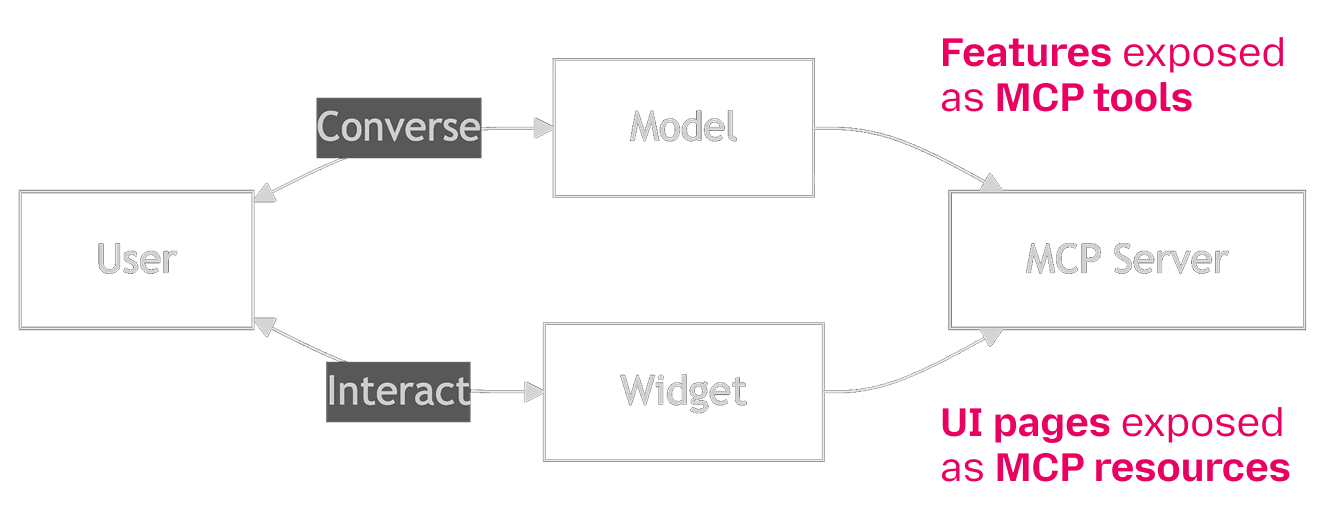
To help you overcome these challenges, we decided to build a TypeScript framework called Skybridge. Skybridge provides:
A React library providing hooks, components, and the runtime glue to render your widgets inside ChatGPT's iframe environment.
A drop-in replacement for the official MCP SDK that adds widget registration and type inference capabilities.
A Vite plugin and dev server setup adding Hot Module Reload and other improvements to your development environment
What follows aims to highlight a few of its building blocks.
Dual surface alignement
data-llm: widget-to-context synchronization
When approaching the challenge of dual-surface alignment, we focused on creating a simple developer interface that enables apps to provide seamless Widget-to-Context synchronization. We settled on what felt like the easiest implementation, a declarative way for widgets to expose additional context to the model.
Every React node can now hydrate a new data-llm attribute. The attribute value is a literal text string that is injected into the model context. Multiple nodes in the widget can set this attribute at the same time. Final aggregated context from all rendered nodes with this attribute will be built, with respect to nodes nested structure, and passed to the model using the window.openai.setWidgetState API. This ensures each component owns what it wants the model to be aware of when rendering its context.
While we experimented with imperative approaches, they were too focused on transitions rather than on state. We wanted to provide components with a simple interface to surface information. Making them declarative ensures the synchronization is always effective: only what’s rendered (and therefore visible to the user) is shared with the model.
Framework React Hooks
Beyond context synchronization, the framework also provides a series of React hooks that make the SDK’s low-level APIs easier to use. These hooks are designed to remove repetitive work that developers would otherwise need to implement by hand (think 85% fewer lines of code). Today we wanted to talk about two foundational examples:
useCallTool: fetching data made simple
OpenAI provides a window.openai.callTool API to fetch additional data from a widget in response to a user interacting with it.
This simple API implements a basic imperative style, returning a promise of data. Loading, error and data state management are left for the developer to implement.
The useCallTool function aims to provide a better abstraction for data fetching, implementing an API pattern made popular by react-query. It wraps the window.openai.callTool function while providing a more convenient state management and typed API.
For example, the code demonstrates how useCallTool can trigger a tool call (such as booking a table for lunch at a restaurant) while managing loading, success, and returned data states.
useWidgetStore: hooks for widget state management
There is only one state available for each widget. It is accessed and updated through the widgetState and setWidgetState APIs available on the window.openai object. Managing its content, however, is up to developers, which means multiple components updating the same state can easily overwrite each other or trigger race conditions.
To address this, we’ve released createStore, a hook-factory method that lets you bootstrap isolated stores for your components, built on top of the Zustand state manager.
What’s next?
Skybridge is growing rapidly, and the examples above represent only a small part of what the framework already provides. Additional hooks are available today, and we’re continuing to add support for more of the workflows developers rely on when building ChatGPT Apps.
Our goal is to make each layer of the process simpler and more reliable. This is only the beginning, and over time, we aim for Skybridge to become the standard way developers build robust, UI-driven ChatGPT Apps on top of MCP.
To get started or to contribute to Skybridge: https://github.com/alpic-ai/skybridge
Liked what you read here?
Get our newsletter!