/
MCP Guides
MCP Apps: how it works and how it compares to ChatGPT Apps
In our last article, we looked at why MCP Apps matter and how this can reshape the relationship between humans, agents, and products. We argued that UI is the missing layer that makes agent interactions feel natural, transparent, and familiar. It brings back the clarity of interface design without returning to the rigid, page-based web. It also gives businesses a new surface to express their brand and guide users through complex tasks.
This article picks up from that foundation and looks at how MCP Apps actually work, and more specifically, how it compares to ChatGPT apps. We break down our analysis into:
Scope of MCP Apps and ChatGPT Apps
Architecture and Guest <> Host communication protocol
Guest <> Host communication features
App development helpers
UI widget _meta properties
Before beginning our analysis, we assume that you have a baseline knowledge of the ChatGPT apps SDK. If that’s not the case, you can check out our article on how it works here: Inside OpenAI’s Apps SDK: how to build interactive ChatGPT apps with MCP
We also assume that you are familiar with the terminology Host and Guest from the specification. Here we’ll refer to “Host” as the MCP Host (ChatGPT, Claude, etc.) and the Guest as your App, more specifically the UI components rendered in the iframe by the Host.
Scope of MCP Apps vs. ChatGPT Apps
In terms of scope, ChatGPT Apps integrates a full runtime for the App widget, an API for communications between the Host (the ChatGPT chat) and the Guest UI (your app), and a set of guidelines on how to build your ChatGPT App.
MCP Apps, on the other hand, only defines the protocol used for communication between the MCP Host and the Guest UI (your app). As we will see, much of the implementation details and design choices are left to the MCP Host, which allow for a range of possible extensions on the client side, but could also introduce differences and potential incompatibilities between OpenAI, Anthropic, Vscode, and other implementations.
Architecture and Host-Guest communication protocol
To understand how Apps load, render, and exchange data with the host, it helps to break the system into layers: how UI assets are declared, how those assets are rendered inside a sandboxed environment, and how the Host and Guest communicate during a session. The following sections walk through each piece of this pipeline so you know exactly what happens between a tool invocation and the widget that appears on screen.
UI resource declaration: Just as in ChatGPT Apps, UI in MCP Apps (i.e. the HTML entry file that you want to render in your iframe) is exposed as a special MCP resource must be pre-declared in the MCP Tool _meta property.
This allows the host to control and verify the UI of your app at submission, before it’s installed by anyone, and allows efficient caching by the Host. But the big disadvantage of this method is that it makes server-side rendering impossible, which means slower widget loading times.
UI rendering: The MCP Apps spec leaves the implementation choice to the MCP Hosts, but does require the “double iframe” architecture used by ChatGPT Apps for security reasons. In practice, a first sandboxed iframe is initialized by the Host, then this sandboxed iframe launches a second iframe containing the MCP server UI resources.
Host <> Guest communication protocol: Instead of investing in a new protocol, the MCP Apps spec re-uses the existing MCP JSON-RPC with the `postMessage` browser API for the transport between the Host and the Guest. It’s a pretty clever way to avoid new SDKs and host implementation work, as MCP hosts will be able to re-use the MCP Typescript SDK.
That said, it’s not perfect! This means app developers need to set up the entire MCP communications process themselves. Anthropic has started a reference SDK in the official MCP github repository ext-apps, but it’s still in its infancy. It also means both the Host and Guest need to import the MCP SDK library, which weighs over 3MB! Hopefully someone will build a lightweight version of the MCP SDK before this gets too critical…
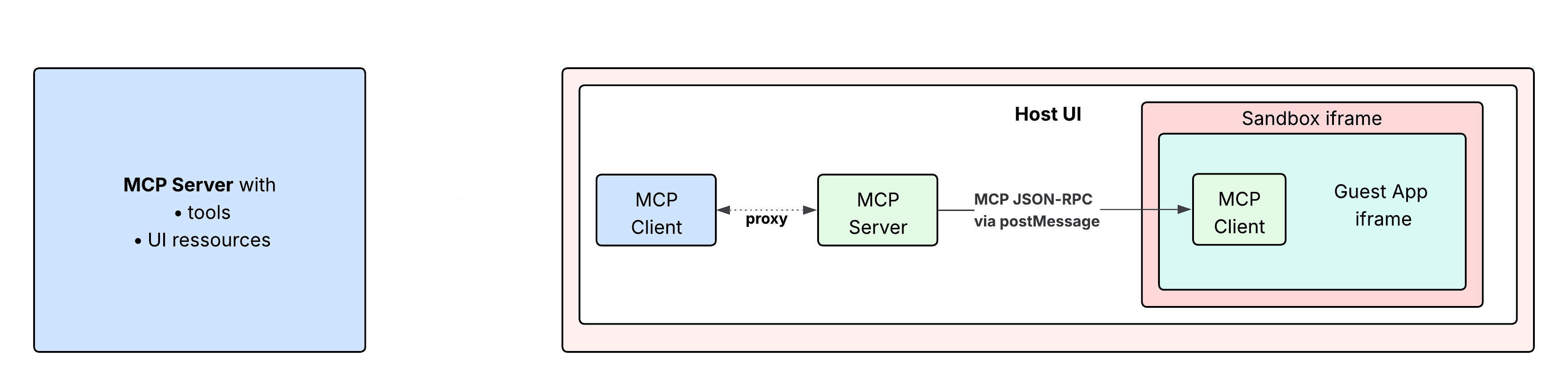
MCP Apps double iframe architecture, using the MCP protocol to communicate between Host and Guest
Guest UI data hydration: OpenAI provides simple property accessors like window.openai.toolInput, window.openai.toolOutput and window.openai.ToolResponseMetadata to hydrate the UI with Tool request and response data.
With MCP Apps, on the other hand, you need to use the MCP Protocol to subscribe to Host’s notifications (keep in mind here that the Host is an MCP Server from the Guest’s point of view!). This introduces new methods in the MCP protocol used to transmit messages from the Host to the Guest that mimic the capabilities of ChatGPT Apps:
ui/notifications/tool-inputcontains the Tool request parametersui/notifications/tool-resultcontains the Tool response parameters
It also adds some new capabilities that are not present in the OpenAI Apps SDK:
ui/notifications/tool-input-partialcan be used if the Host is streaming Tool request parameters to the MCP Server in case input parameters need to be streamed (for instance if you send a large json as an input).ui/tool-cancelledis sent if the tool execution was cancelled.ui/resource-teardownis sent by the Host to warn the Guest the iframe will be immediately destroyed.
You can explore the entire MCP App lifecycle in the draft specification here.
The following table sums up the similarities and differences between MCP Apps and ChatGPT Apps:
MCP Apps | ChatGPT Apps | |
UI resources | Pre-declared resources | Pre-declared resources |
UI rendering | MCP Host’s decision, but double iframe required. | Double iframe architecture (sandbox iframe and App developer iframe) |
Host <> Guest transport protocol | Reuses the MCP JSON-RPC protocol. The Guest is a MCP Client, and the Host is a MCP Server, proxying the MCP requests to the actual MCP Server. | Uses global API object |
Initial UI widget hydration | Via MCP protocol notifications:
(includes tool response _meta field) | via |
Implementation ownership | Double iframe implementation: MCP Host developer Host transport handler: MCP Host developer | All handled by OpenAI, exposing easy APIs to use |
Guest <> Host communication features
Guest and Host don’t just exchange UI data; they also coordinate actions, and the Apps extension adds a few targeted communication features to make that possible.
The MCP Apps extension defines new MCP protocol methods: ui/message to send a message to the Host model and ui/open-link to ask the Host to open an external link. It also allows the Guest App to ask for a Tool call execution, using the standard ToolsCall MCP method, that gets proxied by the Host to the original MCP Server.
MCP Apps | ChatGPT Apps | |
Open external link |
|
|
Send message to the model |
|
|
Ask for a Tool Call to the MCP Server |
|
|
App development helper methods
OpenAI did a great job providing methods that make developing an App easier. This section explores which ones are already in the MCP Apps standard, and which will need to be implemented by the different Hosts.
Features present both in ChatGPT and MCP Apps
Display Mode: ChatGPT allows the Guest to ask for a different display mode (full-screen, PiP…) by using window.openai.requestDisplayMode. MCP Apps do not integrate this exact feature into the protocol, but allow the App developer to get available display modes by checking availableDisplayModes and displayMode properties in the McpUiInitializeResult notification message result.
The Host can also use ui/size-change and ui/host-context-change to notify the Guest that the theme (dark or light), display mode, device orientation or the iframe window have been changed. It’s the App developer’s responsibility to listen and adapt to these changes to keep the UI smooth.
OpenAI-only features
Browser-backed navigation: ChatGPT’s sandbox runtime mirrors the iframe’s navigation history, and allows the App developer to use React Router to control the navigation flow. There’s no mention of this in MCP Apps.
UI component kit: ChatGPT just released a design system called the Apps SDK UI that developers need to use to have their app accepted in the ChatGPT store. On the other hand, MCP Apps will never impose any kind of design system and rather leave it up to the hosts to make their own requirements if necessary. This both offers flexibility to host and app developers, but begs the question of whether we will need to develop 10 versions of our app UIs just to satisfy each major MCP client…
Opening Modals with a portal: Modals generated inside an iframe are messy. ChatGPT provided the window.openai.requestModal method that allows modals to be ported outside the iframe, directly in the main ChatGPT host application.
State Persistence: OpenAI provides APIs to persist state across tool calls with window.openai.widgetState, and even also across sessions with window.openai.widgetSessionId. State persistence is absent from the current MCP Apps specification and seems to be delayed into a future iteration. This is a shame, because it’s hard to do great UX Apps without any state persistence.
MCP Apps | ChatGPT Apps | |
Browser-backed navigation | N/A | Forwarded to Host - recommending React Router |
UI component Kit | N/A | |
Modals API | N/A |
|
Display mode |
|
|
State persistence | N/A |
|
UI widget _meta properties
OpenAI introduced different properties in the MCP Tool response _meta property, extending the original MCP protocol:
OpenAI allows you to configure additional restrictions on how ChatGPT can use your MCP server. You can set openai/widgetAccessible if you don’t want your widget to be able to call other tools, or openai/visibility to private to hide some tools from the LLM, and only make them accessible to your App widget. One could ask if allowing simple API calls to your backend would not be easier, but hey we live in a MCP-first world now!
openai/widgetDescription allows you to summarize what the widget displays to avoid the LLM showing the same content twice.
openai/widgetCSP requires you to specify which domains can be fetched (connect_domains) or loaded by your iframe (resource_domains). These domains are reviewed by OpenAI before app publishing, as they are crucial to avoid XSS attacks.
openai/widgetDomain allows you to specify the subdomain name from which your app will be loaded by the iframe (<domain>.web-sandbox.oaiusercontent.com). This is another security feature, allowing you to restrict the fetching of your UI resources to ChatGPT only.
Finally, openai/prefersBorder allows the MCP Server to request the MCP Host to show a border between the Host app and the Guest iframe.
In MCP Apps, most of these features are present in the UIResourceMeta object that extends the MCP Resource primitive, except the visibility and widgetAccessible parameters.
Here’s a table view comparing the two:
MCP Apps | ChatGPT Apps | |
Tool visibility to LLM | N/A |
|
Allow widget to call tools | N/A |
|
Set Content Security Policies |
|
|
Specific subdomain loading UI resources |
|
|
Show border delimiting Host and Guest UIs |
|
|
Conclusion
To summarize, the MCP Apps spec is an open implementation heavily inspired by ChatGPT Apps, taking the same core decisions (pre-declared resources, double iframe architecture) with one big design difference: using the MCP protocol for Host <> Guest communication. The core spec still lacks a few features that make building ChatGPT Apps easy today, but there’s no doubt MCP Hosts and the open-source community will fill that gap quickly.
At Alpic, we are building Skybridge, an open-source Typescript framework to help developers build ChatGPT (and soon MCP) Apps. Skybridge exposes a set of React hooks that makes developing Apps faster, by taking care of the grunt work for you (like syncing the Navigation state with the ChatGPT widget state). If you want to get started with Apps in just 5 minutes or just contribute to the project, we invite you to clone our App Starter Kit, join our Discord, or publish an issue on the Skybridge Github!
Liked what you read here?
Get our newsletter!