/
MCP Guides
Launch week #2: make your MCP server discoverable
Introducing registry publishing on Alpic
While our focus has shifted to helping you during the build phase, we’re not losing sight of the fact that pushing your servers to real users is just as important.
Our team stays plugged into the broader MCP ecosystem and follows the evolving expectations from AI labs around distribution and app quality. That ongoing work has helped many teams get early feedback on their ChatGPT apps and prepare them for better visibility.
Today, we’re taking a first step to formalize that commitment. Alpic now lets you publish your MCP server directly to the official MCP Registry.
Why the registry matters
The official MCP Registry, launched in September 2025, is now the ecosystem’s primary catalog and API for publicly available MCP servers. It replaces fragmented, inconsistent lists with one standardized source of truth for discovery.
The Registry is open source and serves as the upstream dataset for both public marketplaces and private enterprise registries. Its credibility comes from its maintainers: an official MCP working group that includes Anthropic, GitHub, Block, and others.
Publishing to the MCP Registry brings three concrete benefits:
Better discovery: Agents and users find your server through a single, authoritative entry point.
Automatic distribution: Your listing propagates to downstream catalogs like GitHub MCP, VS Code, and Pulse MCP without extra steps.
Standards compliance: Alpic produces a
server.jsonaligned with the registry’s OpenAPI spec so your server works cleanly across all compliant clients.
From the official registry, MCP clients can build opinionated sub-registries while relying on a shared schema and consistent server metadata.
The Registry is quickly becoming the default index for agent-accessible services. Publishing there is the first step to making your server visible across the ecosystem.
Publishing from Alpic
With Alpic; the workflow is intentionally simple.
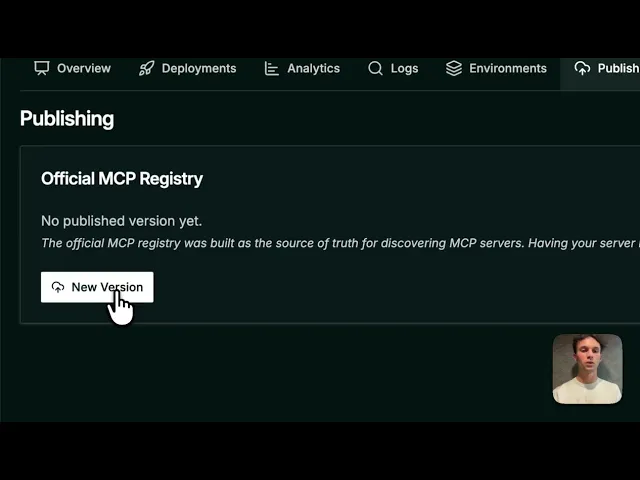
Open the Publishing tab in your Alpic project.
Click New Version to start a new entry.
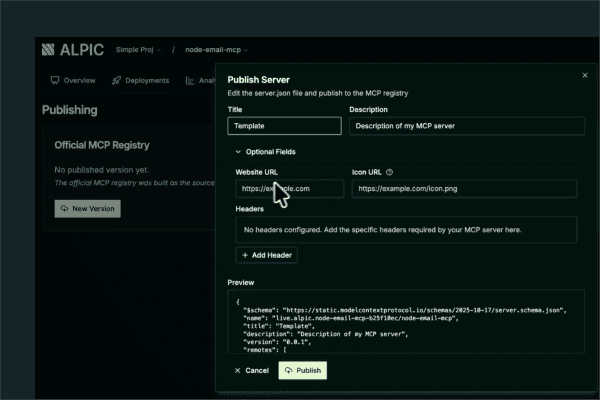
Fill in your server’s title, description, icon, website, and optional headers.
Review the generated
server.json.Click Publish and your server goes live on the official Registry.
Publishing is only available for production environments, which prevents staging servers from leaking into the ecosystem. If your production environment has multiple verified domains, each one can be published independently. Tabs in the Publishing section let you manage each domain’s registry entry.
Plus, the naming conventions and versioning required are all handled by Alpic.
Reverse-domain naming is generated automatically, for example:
com.example.mcp/my-serverSemantic versioning starts at
0.0.1and increments on every publish.
Beyond the official registry
While the official registry is the upstream source of truth, many are rightfully most concerned with visibility across other directories. Once you have your live link from Alpic, you can easily submit your server to additional catalogs, including:
Claude (reviewed submission)
Cursor (direct form)
Goose Registry (GitHub discussion)
OpenAI ChatGPT App Store (coming soon)
And as we mentioned earlier, we stay closely aligned with the teams shaping the MCP ecosystem to make this workflow as smooth as possible. As the new app distribution channels roll out, our aim is to simplify validation and publishing so your server shows up where it should, with minimal manual effort.
Check out our demo below and head to the Alpic platform to try it out!
Liked what you read here?
Get our newsletter!