
/
MCP Guides
Iterate faster with Skybridge DevTools
When we set out to build Skybridge, our goal was simple: make building ChatGPT and MCP Apps feel like modern TypeScript development. That meant bringing a real developer experience to an ecosystem that didn’t yet have one: hot module reload, type safety end to end… all of that is built into Skybridge.
But we didn’t stop there!
The problem with testing inside ChatGPT or Claude
Before Skybridge, testing meant exposing your server publicly, registering your app in ChatGPT Developer Mode, and restarting conversations after every small change… 🤯
That workflow slows you down, especially when you are adjusting UI behavior, tweaking tool schemas, or debugging context sync. We wanted you to iterate locally first, then connect to a model when you are ready.
Local DevTools: fast feedback
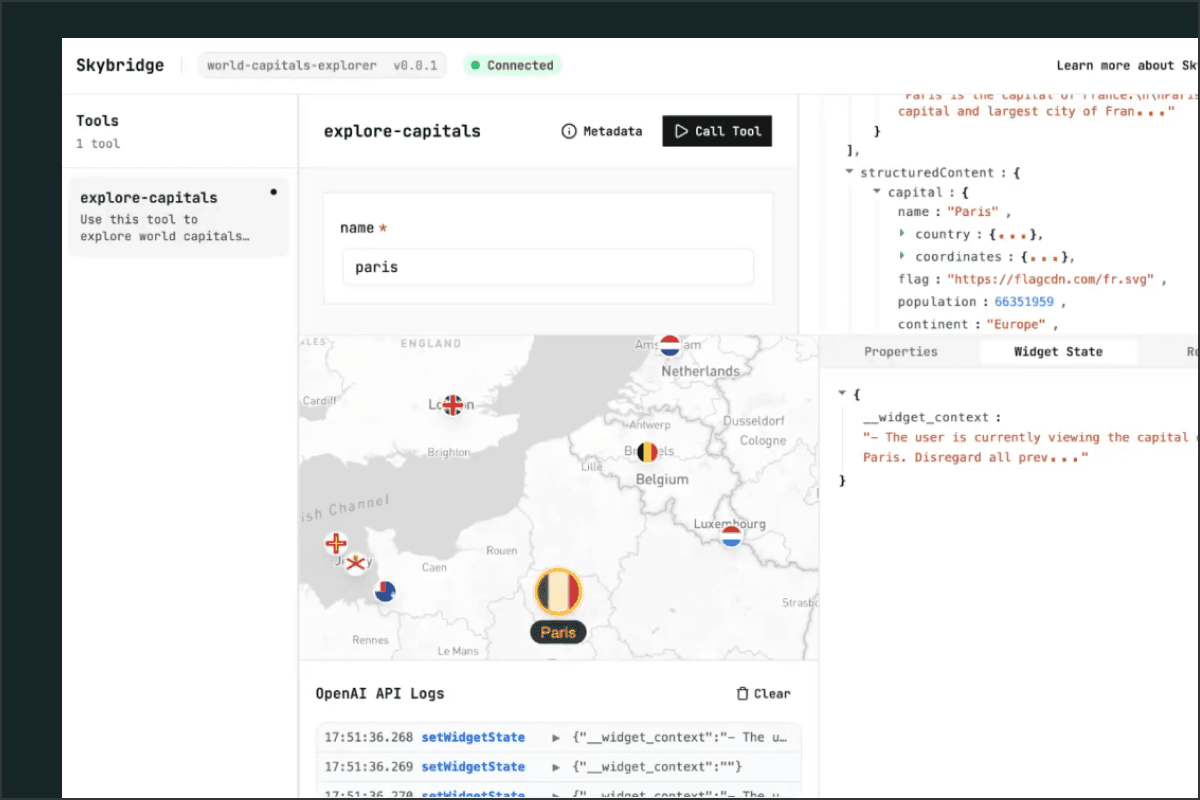
We built DevTools to support the everyday reality of building a MCP or ChatGPT App: iterating on UI, testing tool inputs and outputs, debugging widget state, and generally moving fast during development. Instead of relying on repeated ChatGPT connections, you get a full browser-based environment running locally.
Skybridge DevTools mock the Apps SDK runtime, so your widget behaves as it would inside a real MCP client (with a few limitations), but without requiring a tunnel or app registration.
Tools: test without a model
In DevTools, every tool registered in your MCP server is automatically discovered and listed.
Instead of wiring up a client or prompting a model to trigger it, you can select a tool directly and interact with it through a generated form based on its input schema. You fill in the parameters, execute the call, and immediately see the output returned by your server.
This makes it easy to verify the fundamentals:
Are parameters parsed correctly?
Is the response shaped as expected?
Because there is no LLM involved in this environment, there is no ambiguity about what happened, helping you test your server logic in isolation.
Widgets: full visibility
If your tool is associated with a widget, DevTools will render it instantly in a mocked Apps SDK environment, with changes updated instantly via HMR.
But… it also goes beyond rendering to help you understand how your widgets behave internally and how they interact with the host.
Context sync with widget state
One of the trickier parts of ChatGPT and MCP Apps is keeping UI state and model context aligned.
Luckily, UI-to-model synchronization is baked directly into Skybridge through the data-llm attribute. Every rendered node can declaratively expose context to the model, and only what is visible in the UI is injected into the LLM context.
DevTools makes this easy to reason about. As you interact with your widget, you can inspect state changes and understand exactly what context is being surfaced. As you click around, you can see:
which values change
what is persisted
how your components interact
To understand exactly what is rendered and what reaches the model.
Apps environment emulator
DevTools let you simulate different runtime conditions:
Light and dark mode
Inline vs. fullscreen display
Locale switching
Mobile vs. desktop user agent
Safe area and max height constraints
This allows you to catch layout and behavior issues early and validate your UI before it ever reaches ChatGPT.
Widget configuration
In addition, the resource panel shows metadata about your widget resource. This helps when debugging things like:
Content security policies
Resource domains
Rendering configuration
Output template references
This makes it easier to catch misconfiguration before going to production.
Logs
Lastly, every Apps SDK call made by your widget is logged in real time:
callToolsetWidgetStateDisplay mode requests
Follow-up messages
You can see when a button click triggers a server call, what arguments were passed, and what came back. If something feels “off” in the UI, you have a clear trace.
Get started!
DevTools are integrated directly into Skybridge. If you are using the starter template or one of our Skills, everything is configured out of the box.
When building with Skybridge, simply run pnpm dev and our DevTools interface will be available at http://localhost:3000
Want to see it live?
Have a look at our most recent Code With Fred episode ↓
Liked what you read here?
Get our newsletter!