/
MCP Guides
Introducing Beacon: what dozens of ChatGPT app store and Claude directory submissions taught us

Over the past few months, we've submitted dozens of MCP Apps to the ChatGPT store and the Claude Connectors directory, on behalf of our clients and for our own products. Along the way, we learned more about what these platforms check than any documentation ever explained. This post is what we wish had existed before we started, plus the tool we built once we got tired of finding out the hard way.
The checks below matter not just because platforms enforce them, but also because they affect the quality of your app. Getting listed is the baseline, but many of these tips are also going to help agents (and humans) have a delightful experience.
The review process isn't trivial
Getting listed in the ChatGPT store or the Claude directory isn't as simple as pointing OpenAI or Anthropic at a URL. There's a review process, and it checks things that aren't always obvious: protocol correctness, tool metadata quality, widget rendering, security configuration… An app that works perfectly in dev mode can still fail review if the tools are lacking proper annotations or proper CSP configurations.
The frustrating part isn't any individual requirement but that each submission is a full review cycle. You might fix one problem, resubmit, and only then discover another issue.
There's no pre-flight check built into the platforms themselves, so we decided to build one! Creating Beacon, our automated audit tool for MCP Apps, involved mapping out every category where submissions consistently run into trouble. Here's what we found, and what we included in our tool.
What the platforms check
Basic “plumbing”
Before anything else, the platform runs a set of binary checks that either pass or fail cleanly:
Server is reachable and responds quickly
Protocol version is correct
Tools list and resources list both respond as expected
All necessary metadata is present (server manifest, tools, parameters, resources, hints…)
Resources (which hold UI code) are correctly wired to their tools
These may seem simple, but they're blockers to the rest if they fail.
Beacon checks all of these automatically and reports response time, protocol version, and any wiring issues between tools and resources.
Tool quality
This is where most apps have room to improve, and where the gap between "passing review" and "building something good" is most visible.
To pass review, every tool needs a description, and every parameter within each tool needs a description. This may seem obvious, but it matters beyond the review process: the AI calling your tools is only as good as the context you give it. Treat tool descriptions as product copy, not documentation boilerplate.
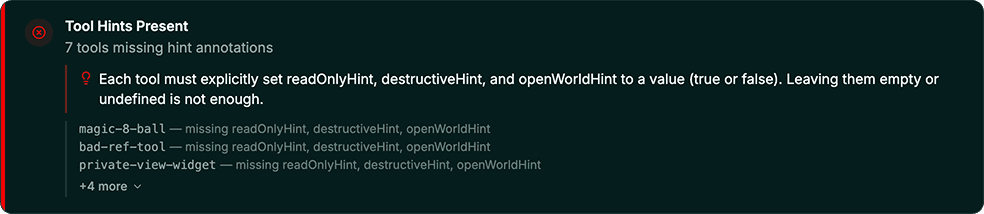
Among the less obvious criteria, tool annotations are a common reason for rejection and are useful insofar as they tell the AI how to handle each tool safely. Every tool can have three:
readOnlyHint:trueif the tool only fetches or retrieves data;falseif it can create, update, delete, or trigger any action.destructiveHint:trueif it can cause irreversible outcomes: deleting records, sending messages, revoking access.falseif none of that applies.openWorldHint:trueif true, this tool may interact with an "open world" of external entities (social media, external emails, third parties endpoints);falseif it operates entirely within closed or private systems.
Each annotation must be set, and a justification for each of the values is asked when submitting your app. Since these hints will help the host decide if they need to warn users about the next tool call, a readOnly tool needs to accurately explain why it doesn’t modify any data. This catches many developers off guard until the submission comes back.
Beyond the mandatory checks, there are best practices worth applying. For example, adding a openai/toolInvocation/invoking & openai/toolInvocation/invoked in each tool’s meta controls the text that appears in the chat interface while the tool is being called. Without it, users see the raw “Calling tool…”; with it, they see something human-readable ("Search holiday cottages"). Small detail, but it makes your app look more polished.
Beacon flags missing tool and parameter descriptions as warnings, annotation issues as errors, and surfaces suggestions like missing title annotations separately so they don't get lost in the noise.
Widget rendering
OpenAI & Anthropic naturally verify that UI widgets render correctly inside their products. Reviewers test on desktop, iOS, and Android, and OpenAI has been known to test on slightly older OS versions as well. Don't assume a widget that looks right on a recent device will behave the same everywhere. Test on all three surfaces and a variety of operating systems before you submit.
Load time is also part of the check. A widget that times out or loads slowly during the review browser session can fail even if it renders correctly when you test it locally.
Beacon renders your widget inside real browser sessions for both ChatGPT and Claude and measures load time as part of the check. The side-by-side result tells you exactly what reviewers will see on each platform.
Content security policy
The most common failure we've seen involves content security policies (CSP): an app that works well in dev mode can get rejected if it is missing a CSP directive. ChatGPT dev mode displays some warnings but they are pretty hidden and easy to miss. The following fields are critical:
connectDomains: this must include every domain your widget fetches data from. If a domain isn't listed, requests to it will be blocked inside ChatGPT and your app will fail. This includes your APIs, third-party APIs (a map service for instance) and anything external.resourceDomains: similar, but for static assets: images, fonts, scripts loaded from external sources.frameDomains: required if your widget embeds iframes.redirectDomains: required if your app directs users outside the widget to an external site, for instance to complete a purchase. Without it, users see a warning that they're leaving ChatGPT. This one is consistently forgotten.ui/domainoropenai/domain: must be declared in the resource's_metaand must be unique per widget. The "punch out" button in the ChatGPT interface uses this domain as its default destination and cannot be shared across widgets.
Beacon validates every CSP field individually and flags exactly which domains are missing, so you're not left guessing why a widget that worked locally is failing in review.

Edge-case input handling
Reviewers will not always test these manually, but they might do it via automations (and they always happen in production). Make sure your tools handle empty strings, null values, missing required fields, dates in the pasts, and out-of-range inputs gracefully. The best response to bad input is an informative error that tells the LLM what went wrong and how to correct it. This helps the agent recover without breaking the conversation flow. An unhandled exception can prevent your widget from rendering entirely, which is grounds for rejection and a broken experience for your users.
This is where Beacon's AI Review layer comes in. It generates adversarial inputs (empty strings, nulls, out-of-range values, Unicode edge cases), calls each tool, and has an LLM judge how the responses are handled.
The beacons are lit!
In Lord of the Rings, the beacons of Gondor exist for one purpose: to warn you something is coming early enough to do something about it. That's what Beacon does for your MCP App, before you submit.
The output is a structured report with pass/fail results per check, severity labels, and links to the relevant platform documentation so you know exactly what to fix. Results are split by platform so you can see at a glance what's blocking approval on ChatGPT versus Claude, and what's a suggestion versus a hard requirement. Just hit ‘improve the score,” and we’ll give you the exact prompt you need to pass to your coding agents to fix the issues!
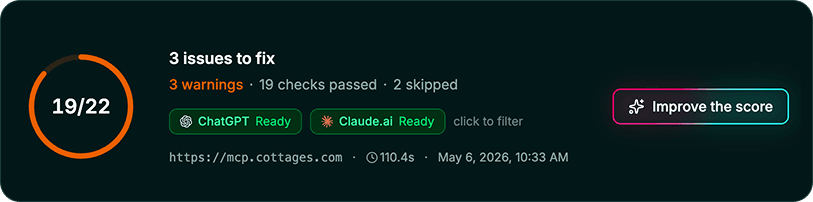
Available from the Alpic dashboard or via CLI with alpic audit.
Have a sever you'd like to try? Simply copy the URL and run our audit to Beacon today!
Liked what you read here?
Get our newsletter!